
Top Sports Vision AI Models for US Sports Teams (2026)
Updated: 4 days ago
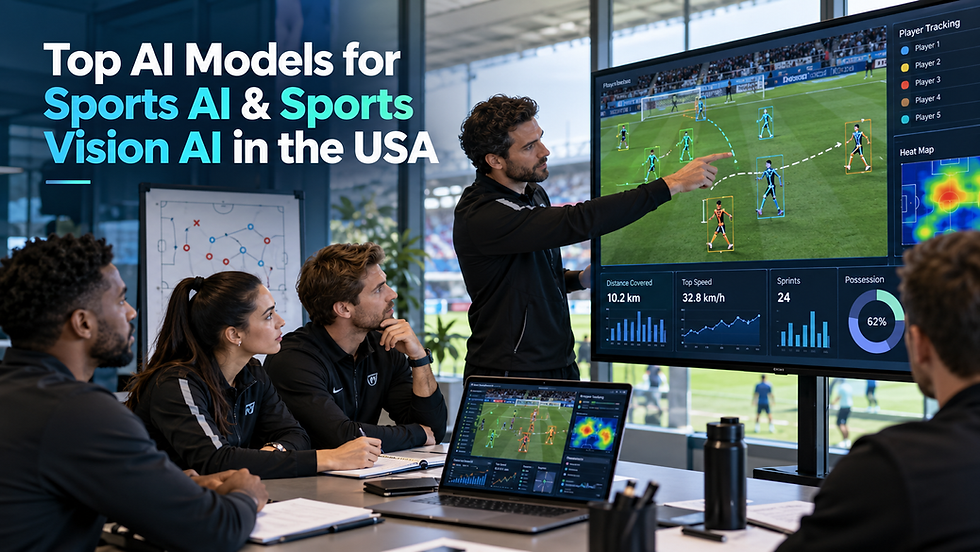
AI Summary: The most useful Sports Vision AI solutions combine several models rather than relying on one. YOLO and RT-DETR identify players and balls; MediaPipe and OpenPose estimate body movements; ByteTrack and BoT-SORT help maintain player identities; XGBoost and time-series models analyze performance trends; and transformer or multimodal models support reporting. For US teams, leagues, and sports startups, the best stack depends on the sport, camera footage, accuracy requirements, budget, and how coaches will use the results.
Sports teams are recording more video than ever, but recording footage does not automatically create useful insights. Coaches still need to understand where players moved, why a tactical sequence worked, and which actions deserve review.
For US sports organizations, choosing the right technology begins with the problem, not the popularity of a model. This guide explains the leading model families, their real applications, and the questions to ask before investing in Sports AI model development.
What Is Sports Vision AI?
Sports Vision AI uses computer vision to interpret sports images and video. It can detect athletes and equipment, estimate body position, follow objects across frames, and identify patterns in play.
Broader Sports AI also includes models trained on statistics, sensor readings, match events, and historical records. A complete product might use video models to extract movement data, a predictive model to study trends, and a language model to explain findings to a coach.
Top AI Models for Sports AI and Sports Vision AI
1. YOLO for Player and Ball Detection
YOLO is a practical starting point for identifying players, officials, balls, and equipment in video frames. It is often considered for fast pipelines where processing speed matters.
For example, a football analytics application may use a detector to identify players in each frame before mapping their movement. A basketball system might identify players and the ball for later event analysis.
Best for: Object detection and real-time video processing.
Limitation: Finding the same player in successive frames requires tracking logic; detecting tiny, fast balls may require sport-specific training data.
The Ultralytics tracking documentation explains how detection can be paired with tracking algorithms.
2. RT-DETR for Alternative Object Detection
RT-DETR is a transformer-based object detector worth benchmarking against YOLO on difficult footage. Its suitability depends on hardware, training data, and the desired trade-off between speed and accuracy.
Best for: Evaluating detection quality in a custom vision pipeline.
Limitation: The model still needs appropriate data, deployment optimization, and separate tracking functionality.
3. MediaPipe and OpenPose for Movement Analysis
Pose estimation identifies locations such as shoulders, elbows, hips, knees, and ankles. In tennis, it can support serve review; in golf, it can help compare visible swing mechanics; and in strength training, it can surface movement patterns for coaching discussion.
Google's MediaPipe Pose Landmarker provides body landmark estimates for images, videos, and live streams.
Best for: Technique review and movement visualization.
Limitation: Camera angle, obstruction, and apparent depth can affect measurements. Pose estimates should not be represented as medical diagnoses or guaranteed biomechanical measurements.
4. ByteTrack and BoT-SORT for Player Tracking
Object detection answers where is a player right now? Tracking tries to answer is this the same player in the next frame?
ByteTrack and BoT-SORT are common starting points for AI models for player tracking. A tracking pipeline can produce movement paths, spatial summaries, and heatmaps when identity continuity is good enough.
Best for: Multi-player tracking across video frames.
Limitation: Overlapping players, matching uniforms, camera cuts, and people leaving the frame can break identities. These are tracking algorithms used alongside detectors, not standalone player-detection models.
5. ResNet and Other CNNs for Visual Classification
Convolutional neural networks, including ResNet-style architectures, can classify image crops or support downstream visual recognition tasks.
Best for: Image classification and visual feature extraction.
Limitation: Understanding a complete sporting action normally requires temporal context rather than one image alone.
6. LSTM and Time-Series Models for Performance Trends
Not every useful sports insight starts with video. Training loads, minutes played, session ratings, and other observations change over time.
LSTM and related time-series approaches can help examine trends across sequential measurements. A team may use them to flag unusual patterns or support planning, provided the source data is consistent.
Best for: Sequential performance and workload analysis.
Limitation: Predictions depend on data quality and validation. Injury-risk signals should be interpreted by qualified professionals rather than treated as reliable individual injury forecasts.
7. XGBoost and LightGBM for Structured Analytics
Many coaches already have structured information: minutes, shots, passes, attendance, session loads, and player histories.
XGBoost and LightGBM can turn those records into predictive or ranking models. For smaller projects, they may be easier to benchmark and explain than complex end-to-end video systems.
Best for: Performance forecasting, player comparison, and structured decision support.
Limitation: Biased, incomplete, or inconsistent historical data can produce misleading rankings.
8. Reinforcement Learning for Tactical Simulation
Reinforcement learning studies how an agent selects actions based on outcomes or rewards. In sports, it is most relevant to simulations and experimental decision support.
A research team might explore simulated formations, possession strategies, or training scenarios. It is not a substitute for game understanding or coach judgment.
Best for: Controlled tactical experiments and simulation. Limitation: A simulated strategy may not transfer well to real matches, particularly when the environment oversimplifies athlete behavior.
9. Transformer Models for Reports and Sports Workflows
Language models can make sports data easier to work with. They may summarize verified match events, explain dashboard metrics, produce first-draft scouting reports, or answer questions against approved team records.
Best for: Search, reporting, and analyst productivity.
Limitation: Models can invent details when evidence is missing, so review and source grounding are essential.
10. Multimodal Models for Combined Sports Intelligence
Multimodal systems combine more than one information type, such as video, text, tracking data, and match events.
A product could connect a sprint detected in footage with its timestamp, player position, and the subsequent attacking play. This makes the insight more useful than reporting distance alone.
Best for: Connected match intelligence and contextual analysis.
Limitation: Synchronization, data licensing, evaluation, and infrastructure often matter as much as the model itself.
Comparison: Which Model Fits Your Sports Product?
Product requirement | Starting model or approach | What to validate |
Detect players and balls | YOLO or RT-DETR | Recall on difficult frames |
Track movement over time | Detector + ByteTrack or BoT-SORT | Identity switches and missed tracks |
Analyze technique | MediaPipe or OpenPose | Landmark consistency across angles |
Analyze training history | LSTM or time-series models | Error on unseen athlete data |
Rank or forecast using statistics | XGBoost or LightGBM | Bias, calibration, and reliability |
Generate analyst reports | Transformer language models | Factual grounding and review effort |
Combine match footage and stats | Multimodal pipeline | Synchronization and evidence quality |
How US Sports Organizations Should Evaluate Computer Vision
A dependable AI sports video analytics product starts with a representative test. Use footage from the same camera setups, lighting conditions, sports level, and venues expected in production.
Evaluate at least four practical measures: detection accuracy, player identity consistency, processing time, and the effort needed to correct results. For a coach-facing product, useful outputs and review time may matter more than benchmark scores alone.
For teams seeking computer vision for sports analytics and custom sports app development features, test an end-to-end workflow first: upload a clip, detect relevant activity, review mistakes, and export an insight coaches can actually use.
Where SportsFirst Fits In
SportsFirst works with sports businesses and startups building custom applications and AI-supported workflows. Depending on the project, that can include footage assessment, model selection, player tracking, video-analysis pipelines, dashboards, and integration into an existing sports product.
Ready to Build a Sports Vision AI Product?
Frequently Asked Questions
1. What is Sports Vision AI?
Sports Vision AI uses computer vision to identify players, track movement, estimate poses, and analyze sports footage.
2. Which AI models are best for player tracking?
YOLO or another detector paired with ByteTrack or BoT-SORT is a practical starting point. Test accuracy on real matches.
3. Can sports AI analyze ordinary match videos?
Yes, but results depend on video resolution, camera movement, lighting, occlusion, and the sport being analyzed.
4. Do US sports startups need custom AI models?
Not always. Start with proven models, then fine-tune or build custom components when testing shows a clear need.
5. How much does Sports Vision AI development cost?
Cost depends on data preparation, video length, model accuracy requirements, integrations, hosting, and review workflows. A scoped pilot helps estimate the full project.
