
How to Automate Fixture Scheduling with a League Management System
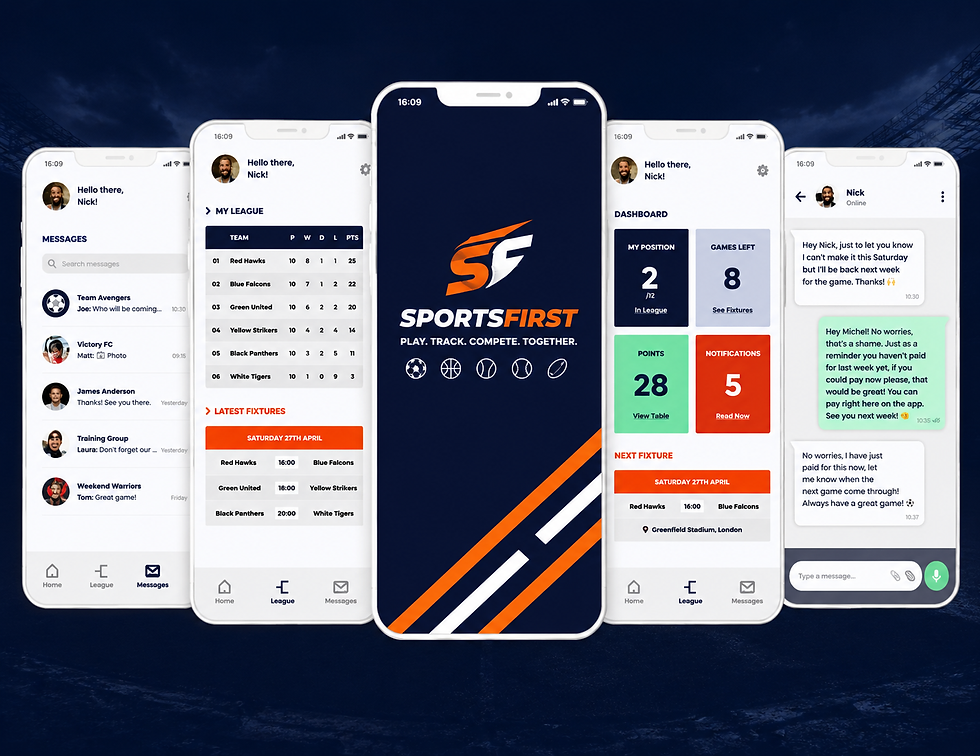
Table of Content :
Introduction: Why Fixture Scheduling Becomes Difficult as Leagues Grow
It's Sunday night, you're three cups of coffee deep, surrounded by printed spreadsheets, and you're still trying to figure out why Team A and Team B are both booked at Field 3 on Saturday at 10am. Sound familiar?
If you're running a sports league in the US - whether it's a youth soccer association, a recreational basketball league, or a competitive esports circuit - fixture scheduling is probably the task that keeps you up at night. And the bigger your league gets, the messier it becomes.
What starts as a manageable puzzle with six teams quickly becomes a logistical nightmare when you're juggling 40 teams, multiple age groups, shared venues, coach availability, and a hundred other variables that refuse to cooperate at the same time.
The good news? You don't have to keep doing it the hard way. A fixture scheduling league management system exists precisely for this problem - and once you experience automated scheduling, you'll wonder how you ever survived without it.
What Is Fixture Scheduling in League Management?
Fixture scheduling is the process of organizing all matches in a league season - deciding who plays whom, when, and where. Simple enough when you say it out loud. Brutally complex when you actually try to do it.
Good fixture scheduling balances competitive fairness (making sure every team plays each other the right number of times), logistical reality (venues, time slots, travel distances), and human constraints (team availability, referee schedules, school holidays). Miss any one of those and you've got coaches calling you at 7am on a Tuesday.
At its core, fixture scheduling is what makes a league feel organized and professional - or chaotic and amateur. The experience of every player, parent, coach, and fan flows directly from how well the schedule is built.
Why Manual Fixture Scheduling Creates Problems for League Admins
Let's be real about what manual scheduling actually involves. You're working across multiple spreadsheets, cross-referencing venue availability calendars, texting team managers to confirm their blackout dates, and trying to remember that the high school gym isn't available on holiday weekends.
The problems aren't a matter of effort - most league admins work incredibly hard. The problems are structural. Spreadsheets don't flag conflicts automatically. They don't notify teams when something changes. They don't rebalance a schedule when two games need to be rescheduled after a rainout. And they definitely don't send automatic fixture updates to 300 parents.
Manual scheduling also doesn't scale. What works for a 10-team league falls apart completely at 30 teams. And when it falls apart, the admin pays the price in hours, stress, and frustrated emails from people who definitely could've checked the schedule themselves if it had been communicated properly.
What Is a Fixture Scheduling League Management System?
A fixture scheduling league management system is software designed to automate, manage, and communicate the entire scheduling process - from setup to publication to real-time updates.
Instead of building schedules manually, admins input their league structure, venues, rules, and constraints, and the system generates optimized fixtures automatically. It flags conflicts before they become problems. It lets you publish schedules directly to teams, coaches, parents, and fans. And when changes happen - because they always do - it handles rescheduling without requiring you to redo everything from scratch.
Platforms like SportsFirst are built specifically for this, offering US sports organizations a purpose-built solution that handles the complexity of modern league management without the spreadsheet chaos.
How Automated Fixture Scheduling Works
Think of automated scheduling as having a very smart, very tireless assistant who knows every rule of your league, never double-books a venue, and remembers every team's constraints without being reminded.
You define the parameters - league format, venue availability, team constraints, scheduling rules - and the system applies them algorithmically to generate a complete fixture list. It checks every match against every constraint in real time. It balances home and away games. It respects rest periods between matches. And it produces a schedule that a human would take days to build, in a matter of minutes.
The best sports league management systems also make that schedule easy to review, edit, and approve before it goes live - because automated doesn't mean untouchable.
Step 1: Add Teams, Divisions, Age Groups, and Competitions
Every good schedule starts with good data. The first step is building your league structure inside the system - entering all your teams, organizing them by division or age group, and setting up the competitions you're running.
Good league management software makes this straightforward with bulk import options, so you're not entering 50 teams one at a time. It also lets you manage multiple competitions simultaneously - useful for organizations running both a regular season and a cup competition at the same time.
Get this foundation right and every step after it becomes much easier. Cut corners here and you'll be correcting errors downstream.
Step 2: Set Venue Availability and Match Time Slots
This is where most manual scheduling breaks down — venue management. You might have three fields at one location, two gyms across town, and a handful of external venues you use for overflow. Each has its own hours, blackout dates, and capacity limits.
A proper online league management platform lets you define each venue's availability precisely - including recurring unavailability (like every Sunday morning when the church group uses the parking lot) and one-off dates. You set your available time slots, and the system only schedules matches when the venue is actually free.
No more double-bookings. No more discovering on Friday that Saturday's game has nowhere to be played.
Step 3: Define Scheduling Rules and Constraints
This is where the magic really happens. Rules and constraints are what turn a random list of matches into a fair, workable schedule.
Common constraints include minimum rest days between matches for the same team, maximum matches per week per team, home/away balance requirements, geographic proximity rules to limit travel, and rivalries or derbies that need to be scheduled at specific points in the season.
For youth sports league management software, you might add constraints around school exam periods, holiday weekends, or age group curfews. For esports league management software, time zone balancing across regions becomes a critical constraint. The system handles all of it - as long as you define it upfront.
Step 4: Avoid Team, Venue, and Time Conflicts Automatically
Here's the thing about conflicts - in a large league, they're almost mathematically inevitable if you're scheduling manually. Too many variables, too many moving parts, and human brains just aren't built to hold all of it simultaneously.
Automated scheduling checks every proposed match against every constraint before it's placed in the schedule. If Team B is already playing that Saturday, they don't get another game that day. If Venue 2 is booked for a tournament that weekend, no matches get scheduled there. If a team has flagged a blackout date, the system respects it.
This alone - conflict elimination - is worth the price of a league management system for most organizations.
Step 5: Generate Fixtures Based on League Format
Different leagues run differently. Round-robin, single elimination, double elimination, Swiss format, group stage followed by knockouts - each has its own structural logic that affects how fixtures are generated.
A good sports league management software platform supports multiple formats and generates fixtures accordingly. For a round-robin league with 12 teams in two divisions, it'll calculate the exact number of matches per team, balance home and away games, and distribute fixtures across your available time slots and venues.
What used to take a weekend of spreadsheet gymnastics takes about five minutes.
Step 6: Review, Edit, and Approve the Fixture List
Automation gets you 90% of the way there. The review step gets you to 100%.
Once the system generates the schedule, you get a full visual overview = typically in a calendar and list view - where you can check for anything that looks off. Maybe you want to move the season opener to a higher-capacity venue for a bigger crowd. Maybe a particular team has a local event that weekend you know about but didn't enter as a constraint.
The best systems make these edits easy - drag and drop rescheduling, quick swap tools, and real-time conflict checking as you make changes. You stay in control; the system just does the heavy lifting.
Step 7: Publish Fixtures to Players, Coaches, Parents, and Fans
A perfect schedule that nobody knows about is useless. Publication is where your scheduling work connects to the people it's meant to serve.
Modern sports league management systems publish fixtures across multiple channels simultaneously - a league website, email notifications, mobile app alerts, and calendar integrations that push match details straight to people's phones. Coaches see their team's full schedule. Parents get reminders before matches. Fans can follow their favorite team's upcoming games.
SportsFirst handles this distribution layer natively, meaning you publish once and everyone who needs to know, knows. No more mass emails with attachments that half the recipients can't open.
Step 8: Manage Rescheduling, Delays, and Last-Minute Changes
In a perfect world, every game happens exactly as scheduled. In the real world, weather happens. Venues cancel. Teams have emergencies. This is where manual scheduling completely collapses - every change cascades into a new round of conflict checking, communication, and administrative headache.
Automated systems handle rescheduling with the same logic they used to build the original schedule. When you need to move a match, the system finds alternative slots that work for both teams and the venue, checks for conflicts, and proposes options. You approve. Notifications go out automatically.
Rescheduling goes from a 2-hour administrative ordeal to a 10-minute task.
Benefits of Using a Fixture Scheduling League Management System
The benefits go well beyond saving time, though the time savings alone are substantial -most league admins report cutting scheduling admin by 60 to 80 percent after adopting automation.
Beyond time, you get fewer errors and conflicts, better communication with teams and families, a more professional experience that reflects well on your organization, and the data visibility to make smarter decisions about how your league is run. You also get scalability - the system that handles your 20-team league today can handle 80 teams next season without breaking a sweat.
For US organizations running youth leagues, the parent communication improvements alone are transformative. Fewer "when is the game?" texts to coaches. Fewer schedule mix-ups. Happier families. Retained memberships.
Key Features to Look for in Automated Fixture Scheduling Software
When evaluating a fixture scheduling league management system, prioritize these capabilities: multi-division and multi-competition support, flexible constraint configuration, real-time conflict detection, venue management tools, automated notifications and publishing, rescheduling tools, mobile accessibility, and integration with payment and registration systems.
For youth and recreational leagues, parent-facing communication tools and age group management are essential. For competitive and esports leagues, advanced format support and bracket management matter more. Know your specific needs before you evaluate — features that matter for one league type may be irrelevant for another.
Common Mistakes to Avoid When Automating Fixtures
The biggest mistake? Garbage in, garbage out. If you don't enter your constraints accurately and completely in setup, the system will produce a technically valid schedule that ignores real-world realities. Take time upfront to define constraints thoroughly.
Second mistake: not reviewing before publishing. Automated schedules are excellent starting points, not final products. Always review before the schedule goes live.
Third: forgetting to communicate the transition to your teams and families. If people are used to getting schedules by email attachment, tell them how the new system works. A quick onboarding message prevents a flood of confused questions.
How Sports Organizations Can Save Admin Time with Fixture Automation
The math is simple but striking. If manual scheduling takes a league admin 20 hours per season across initial scheduling, conflict resolution, rescheduling, and communication -and automation reduces that to 4 hours - that's 16 hours back per season. Multiply that across volunteers who also have day jobs, families, and limited bandwidth, and you're talking about a genuinely meaningful quality-of-life improvement.
For organizations running multiple leagues or seasons per year, the savings compound. And the reduction in errors and conflicts has a value that's harder to measure but equally real - in goodwill, in parent satisfaction, and in the professional reputation of your organization.
Explore how SportsFirst's league management software is built specifically to deliver these outcomes for US sports organizations of all sizes.
Conclusion
Fixture scheduling is one of those admin tasks that's invisible when it works and absolutely impossible to ignore when it doesn't. Every conflict, every double-booking, every last-minute scramble is a moment that erodes trust in your organization.
A fixture scheduling league management system doesn't just make your life easier as an admin - though it absolutely does that. It makes the entire league experience better for every team, every coach, every parent, and every fan who shows up to watch.
Smarter scheduling means games happen on time, in the right place, with everyone knowing where they need to be. That sounds basic. But in leagues across the US, it's genuinely transformative.
Stop wrestling with spreadsheets. Start running your league the way it deserves to be run.
FAQ
1. What is a fixture scheduling league management system?
A fixture scheduling league management system is software that helps sports organizations create, manage, and publish match schedules automatically.
Instead of manually building fixtures in spreadsheets, admins can add teams, venues, divisions, time slots, and rules into the system. The platform then helps generate fixtures while reducing clashes and manual errors.
2. How does a fixture scheduling league management system automate match planning?
A fixture scheduling league management system automates match planning by using team data, venue availability, competition format, age groups, match duration, blackout dates, and scheduling rules.
This helps league admins create organized fixtures faster and avoid common problems like double-booked venues, team conflicts, or uneven match distribution.
3. Why is manual fixture scheduling difficult for league admins?
Manual fixture scheduling becomes difficult because admins need to manage multiple teams, venues, age groups, referees, time slots, and last-minute changes at the same time.
A fixture scheduling league management system reduces this pressure by keeping everything in one place and helping admins make updates without rebuilding the entire schedule manually.
4. Can a fixture scheduling league management system reduce scheduling conflicts?
Yes. A fixture scheduling league management system can reduce scheduling conflicts by checking venue availability, team availability, overlapping games, travel gaps, and time-slot clashes before fixtures are published.
This makes the schedule more reliable for players, coaches, parents, referees, and league organizers.
5. What features should automated fixture scheduling software include?
A good fixture scheduling league management system should include team management, venue management, division setup, rule-based scheduling, conflict detection, drag-and-drop editing, fixture publishing, real-time updates, and communication tools.
For growing leagues, it should also support multi-sport scheduling, referee assignment, standings updates, and mobile-friendly access.
6. How does automated fixture scheduling save admin time?
Automated fixture scheduling saves admin time by reducing manual data entry, avoiding repeated schedule corrections, and making fixture updates easier.
With a fixture scheduling league management system, admins can generate schedules, adjust matches, notify teams, and manage changes from one dashboard instead of using separate spreadsheets, emails, and messaging apps.
7. Is a fixture scheduling league management system useful for multi-sport leagues?
Yes. A fixture scheduling league management system is especially useful for multi-sport leagues because different sports may have different match formats, venue needs, age groups, and scheduling rules.

Comments